FAQ - Frequently Asked Questions
Account: Delete Your Own Account!
How to: Delete Your Own Account!
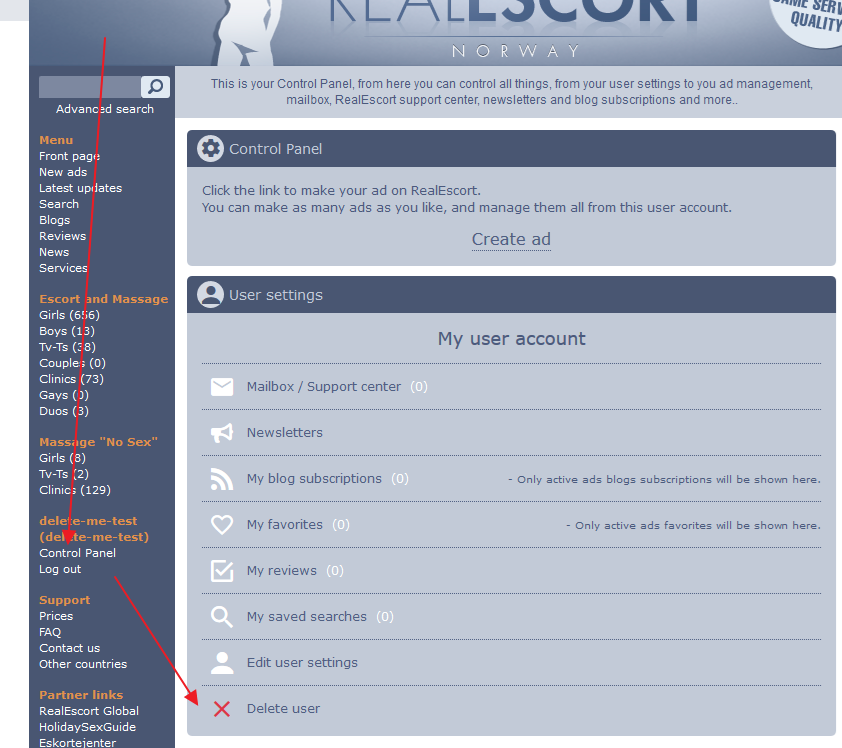
1. Sign in to your account.
2. Select the "Dashboard" option.
3. Scroll to the bottom of the page and click on "Delete User".
4. Please read the provided information before proceeding with deletion.
PLEASE READ CAREFULLY!
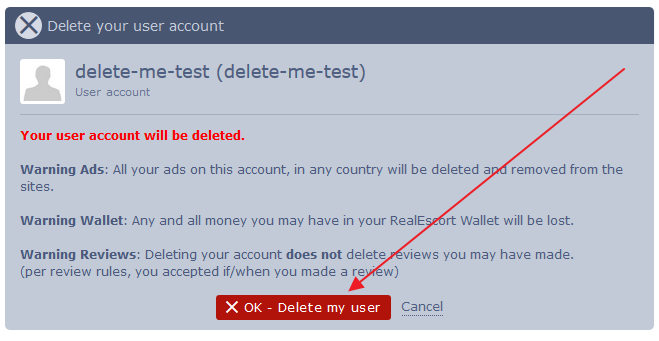
5. Click on "Ok Delete My User".
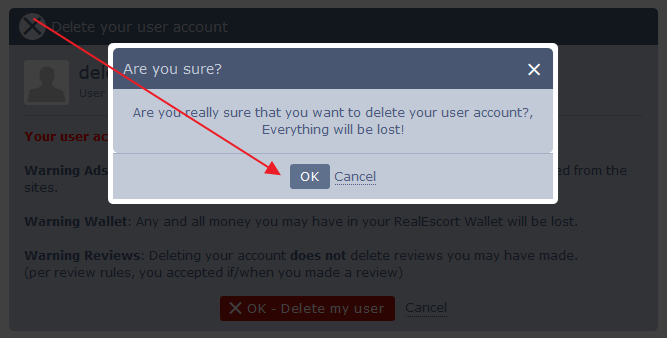
6. We will prompt you once more to ensure you are completely certain about deleting your account.
We bid you farewell and express our gratitude for your time spent on our website.
1. Sign in to your account.
2. Select the "Dashboard" option.
3. Scroll to the bottom of the page and click on "Delete User".
4. Please read the provided information before proceeding with deletion.
PLEASE READ CAREFULLY!
5. Click on "Ok Delete My User".
6. We will prompt you once more to ensure you are completely certain about deleting your account.
We bid you farewell and express our gratitude for your time spent on our website.